In short: Prompt caching charges about a tenth of the normal input price for content the model has seen before, but it matches on exact bytes and fails silently, so most of the saving is lost to details nobody is watching.
Look at what your application sends to a language model on a busy day. The same instructions, the same tool definitions, the same reference documents, resent in full on every single request, and charged for in full every single time.
Prompt caching is the fix for that, and the headline is genuinely good: content the model has already seen costs roughly a tenth of the normal input price. Teams read that number, switch it on, and wait for the bill to fall.
Often it barely moves. The mechanism is easy to describe and unforgiving in practice, and the ways it fails do not raise errors. They just quietly hand the saving back.
What is prompt caching?
Prompt caching stores the processed form of the beginning of your prompt so later requests can reuse it instead of paying to process it again. You mark where the reusable part ends, and everything before that mark is served from the cache on subsequent requests at about a tenth of the normal input price.
That is the entire concept. The difficulty is not understanding it. The difficulty is that it depends on decisions that live in your architecture rather than in a settings panel.
1. The arithmetic is better than most people check
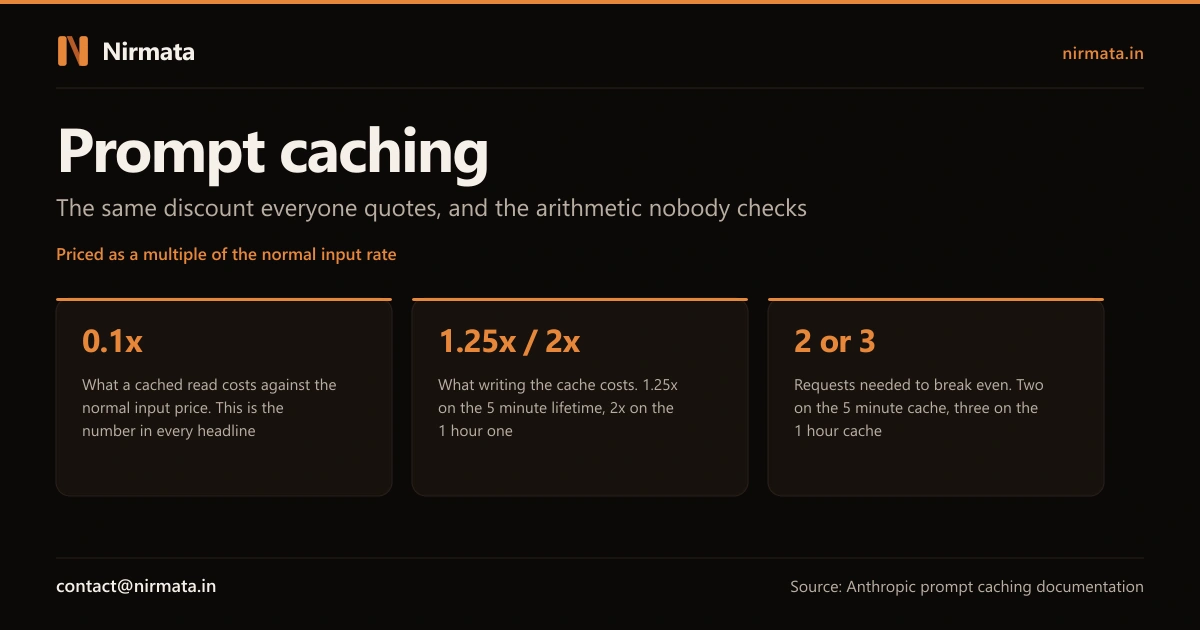
The 0.1x read price is only half the equation. Writing an entry into the cache costs more than a normal request: 1.25x the input price for the standard five minute lifetime, or 2x for the one hour option.
The break-even nobody runs
On the five minute cache, one write plus one read is 1.35x against 2x for two uncached requests, so you break even on the second request. On the one hour cache it is 2.2x against 3x, so you need a third. Below that, caching is a cost increase, not a saving. Figures are from Anthropic’s prompt caching documentation and are expressed as multiples of the normal input price, which is why they do not go stale when list prices change.
So the first question is not how to enable caching. It is whether your traffic pattern reaches the break-even at all. A support assistant handling requests continuously will clear it comfortably. An internal tool used twice a morning may sit permanently on the wrong side of it, quietly paying a premium for a feature that was sold as a discount.
2. It matches on exact bytes, which is stricter than it sounds
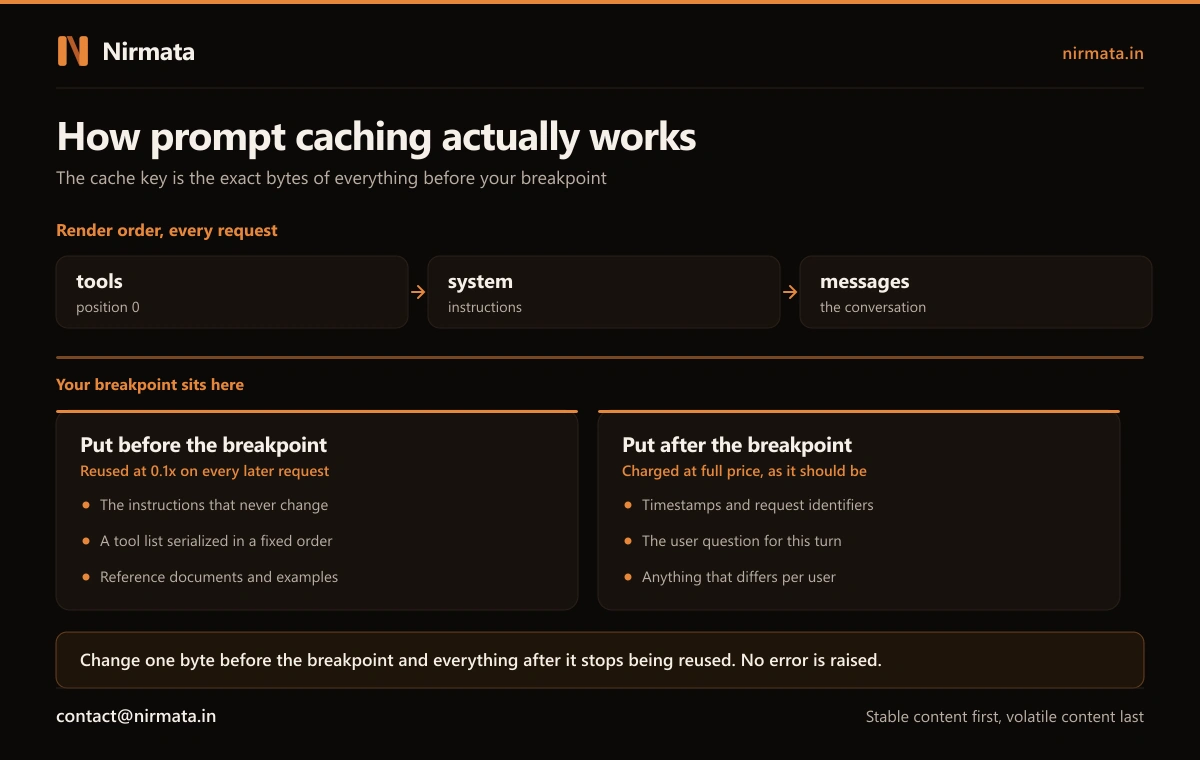
The cache key is derived from the exact bytes of your prompt up to the point you marked. Not the meaning, not roughly the same text. The bytes.
Requests are assembled in a fixed order: tool definitions first, then system instructions, then the conversation. A single changed character early in that sequence invalidates everything after it. This is why the shape of the design matters more than the setting: stable content has to come first, and anything that varies has to come last.
What that means in practice
- Instructions that never change belong at the front, where they can be reused indefinitely
- The user’s actual question belongs at the end, where paying full price for it is correct
- Anything per-customer in the instructions means no two customers ever share a cache entry
- A tool list assembled in a different order on each deploy is a new cache every time
3. Why the saving disappears without anyone noticing
Here is the part that makes this an engineering problem rather than a configuration one. Every failure below is silent. No exception, no warning, no degraded response. The output is still correct. Only the invoice knows.
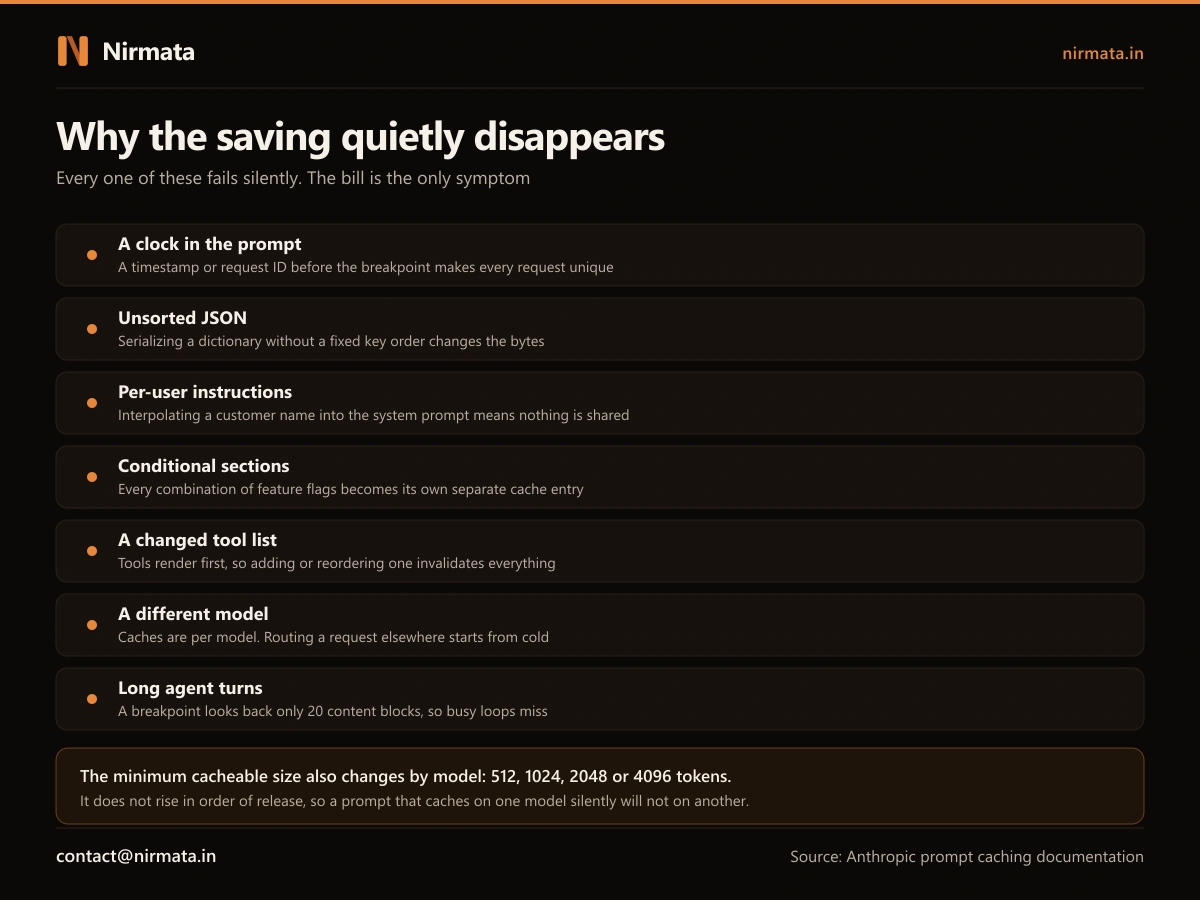
A clock or a request identifier sitting in the instructions makes every request unique. A dictionary serialized without a fixed key order changes the bytes without changing the meaning. Feature flags that add or remove a paragraph turn one cache entry into one per flag combination. Adding a tool invalidates everything, because tools are processed first. Routing a request to a different model starts from cold, because caches do not cross models.
Agent loops have a subtler version: each marker searches back through a limited window of recent content, so a turn that produces a long run of tool calls can overshoot the window and miss a cache that is sitting right there.
And the minimum size behaves in a way that catches experienced teams out. Prompts below a threshold do not cache at all, the threshold differs by model, and it does not increase in release order. A prompt that caches on one model silently will not on another, so a routine model change can switch your savings off without a line of code changing.
4. Measuring it is where most teams are quietly wrong
The response from the model reports how many tokens were written to the cache and how many were read from it. Those two fields are the only honest scoreboard, and reading them correctly is less obvious than it looks: the field showing uncached tokens counts only the remainder, not the total. A system serving almost everything from cache will show a small uncached number that looks like a bargain and tells you nothing on its own.
If the read count stays at zero across requests that should be identical, something in the prefix is changing. Finding out what means comparing the exact bytes of two rendered prompts, which is not a thing anyone does by eye.
Myth vs Facts
Myth: “Prompt caching cuts our AI costs by 90%.”
Fact: It cuts the price of cached input to about a tenth. It does nothing for output tokens, nothing for the uncached remainder, and it charges a premium to write. What lands on your bill depends on how much of your prompt is genuinely stable and how often you reuse it.
Myth: “It is a setting. We turned it on.”
Fact: Turning it on takes minutes. Getting it to pay depends on where your instructions end and your variables begin, whether your serialization is deterministic, whether your tool list is stable, and whether your traffic clears break-even. Those are design decisions, and they are usually already wrong by the time caching is considered.
Myth: “If it were misconfigured, we would see errors.”
Fact: You would see nothing. Every miss returns a completely correct response at full price. Caching is one of the few optimizations whose failure mode is invisible in the product and visible only in accounting, which is exactly why it goes unnoticed for months.
Myth: “The one hour cache is the better option, it lasts longer.”
Fact: It costs double to write instead of 1.25x, so it needs three requests to break even rather than two. It is the right choice for bursty traffic with gaps, and the wrong one for thin traffic, where it deepens the loss.
Prompt caching: symptom, cause, and who fixes it
| What you see | What is actually happening | Where it gets fixed |
|---|---|---|
| Caching is on, the bill is flat | Something in the prefix changes per request | Prompt architecture, not settings |
| Savings appeared, then vanished | A tool was added or a model was changed | Release process and routing rules |
| Costs rose after enabling it | Traffic never reaches break-even | The decision to cache at all |
| Some users benefit, others never do | Per-customer content sits in the instructions | Separating shared from specific |
| Works in testing, not in the agent | Long turns overshoot the lookback window | How the loop is structured |
What this means if you’re running AI in your business
Inference cost is not a line item you can ignore once AI is doing real work. It is the running cost of the system, and it compounds with usage in a way that software licences do not. When we published the 68% cost reduction from one of our deployments, we were careful to state that the figure was net of the system’s own operating cost including inference. That qualifier is only possible when the token economics are engineered rather than hoped for, and caching is a meaningful part of that.
The uncomfortable truth is that caching rewards systems that were built carefully and punishes ones that were assembled quickly. If instructions, per-user data and tool definitions are already tangled together, there is no setting that separates them. That is the same structural problem behind a pilot that worked but never showed up in the costs, and the reason the plumbing between your systems deserves the same attention as the model, which is what protocols like MCP are trying to standardize.
- You know what share of your prompt is genuinely identical between requests
- You know how often that content is reused inside the cache lifetime
- Someone has confirmed the cache read count is not zero in production
- Nothing per-user or time-based sits in the shared part of the prompt
- A model change or a new tool cannot silently switch the saving off
- Inference cost is reported alongside the business result, not separately
Is your caching actually paying?
Tick each that applies to your setup.
- Nobody has checked the cache read count since the day it was enabled
- Your system prompt contains a date, a time or a user identifier
- Tool definitions are built at runtime rather than fixed
- Requests are routed across more than one model
- You could not say today what share of your input is served from cache
If This Were Your System, Here’s Our First Move
We would not start by enabling anything. We would measure what fraction of your prompt is truly stable, how often it repeats inside the cache lifetime, and whether that clears break-even. For a surprising number of workloads it does not, and the honest recommendation is to leave it alone and reduce the prompt instead.
Where it does pay, the work is structural: separating the shared from the specific, making serialization deterministic, fixing the tool list, positioning the boundary, and putting the cache read count on a dashboard so a regression shows up in a day instead of a quarter. That is a few days of engineering that pays back for as long as the system runs.
If your AI costs are rising faster than your usage, or caching is on and you cannot prove it is working, send us what you are running and we will tell you where the money is going before anyone changes a line of code.