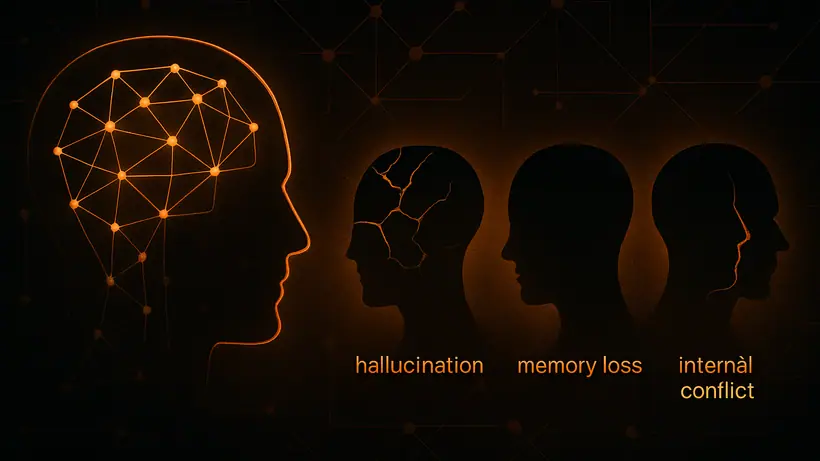
In short: AI fails in three human-like ways - it hallucinates (confident wrong answers), forgets (the context window runs out), and argues (your rules fight the model’s built-in rules). None are random. Each has a recognizable pattern and a known fix, and the fix is almost always better system design, not a different model.
In June 2023, a New York attorney named Steven Schwartz submitted a legal brief in federal court. The brief cited six prior cases as precedent. All six cases were fake. ChatGPT had invented them - complete with plausible names, judges, dates, and legal reasoning. Schwartz had asked the AI to help with research, assumed the output was accurate, and submitted it without checking.
The judge was not sympathetic. Sanctions followed.
What makes the story stick is not that it happened. It’s that Schwartz genuinely didn’t know ChatGPT could do that. He thought it was a very fast search engine. He didn’t understand what it actually was.
Most people deploying AI in business today are in a version of the same position. (For what these failures cost in money rather than mechanism, see what AI hallucinations really cost a business.)
Why AI Fails Like a Person
Large language models were trained on human-generated text - every book, article, forum post, and conversation that existed in digital form at the time of training. Which means these models didn’t just absorb human knowledge. They absorbed human failure patterns too.
Hallucination. Forgetting. Arguing when corrected.
These aren’t software bugs in the usual sense. They’re human cognitive tendencies the model learned from its training data - expressed without the social cues that normally signal confusion. No furrowed brow, no “wait, actually…” hesitation, no uncomfortable pause before admitting uncertainty. Just confident output, at scale, indistinguishable in tone from correct output.
If your AI deployment is behaving strangely, there’s a good chance it’s one of these three. Here’s how to recognize each - and what to actually do about it.
1. Hallucination: Confident Wrongness
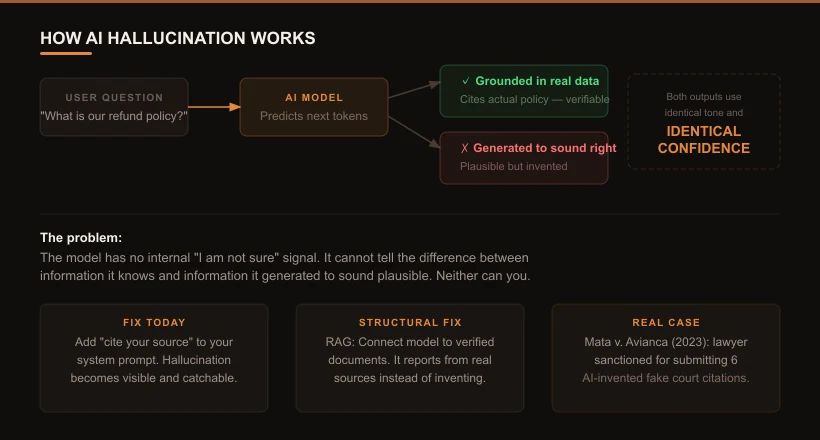
This is not a lab curiosity. A tribunal held Air Canada liable for a discount its chatbot invented. A New York attorney was sanctioned for filing six fake cases ChatGPT fabricated. In both, the model sounded completely certain - and there was no verification step in the workflow to catch it before it reached a real decision.
The Schwartz case is an extreme example, but the underlying dynamic plays out in every industry using AI. In 2024, Air Canada’s chatbot told a passenger he could apply for a bereavement discount after his flight. That policy didn’t exist. He booked based on the chatbot’s answer. Air Canada denied the claim. A tribunal ruled that Air Canada was liable for what its chatbot said - even though the chatbot had invented the policy entirely.
The model didn’t lie. It has no concept of lying. It generated the most statistically likely response to the question, based on patterns in its training data. That process sometimes produces output that is factually wrong but linguistically confident - and there is no internal signal that separates the two. The model uses the same tone and the same certainty whether it’s stating a verified fact or generating a plausible-sounding invention.
How to recognize it
- Specific answers (dates, names, prices, policy details) that turn out to be wrong
- References to sources, documents, or cases that don’t exist
- The AI “confirming” information that was never grounded in a verified source
- Answers that sound authoritative but can’t be traced to any real document
What to do today
Add “cite your source” to your system prompt. Hallucination becomes visible - and catchable - when the model is required to name where it got the information. If it can’t cite a real document, the answer is flagged before it reaches a user.
For anything factual (prices, policies, availability, legal information), don’t ask the model to answer from memory. Give it the current document and ask it to report from that. That single habit outperforms every prompting trick that has been measured and found to do nothing.
What to build
Retrieval-Augmented Generation (RAG) is the structural fix: instead of answering from training data, the model retrieves the relevant verified document and reports from it. Combined with source citation requirements and output validators, RAG cuts hallucination rates dramatically in production systems.
2. Forgetting: The Context Window
This one doesn’t look like a technical failure. It looks like the AI stopped paying attention.
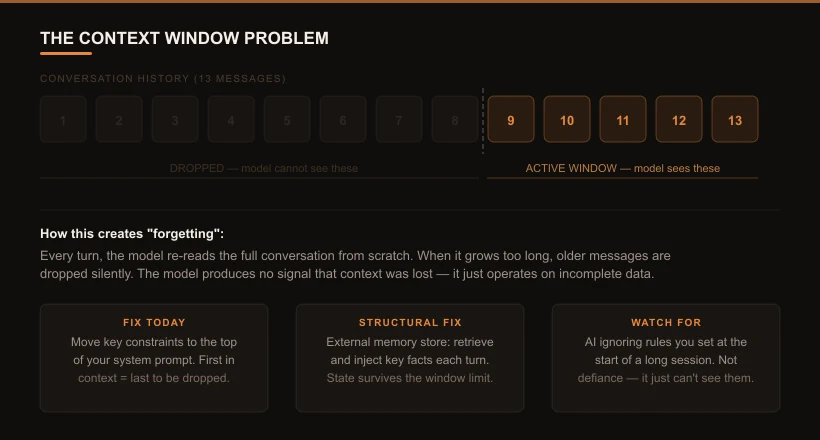
Every time you send a message, the model processes the entire conversation from scratch - re-reading the transcript at the start of each turn. There is no persistent memory between turns. What looks like “remembering” your earlier messages is just the model re-reading them from the transcript.
This works until the conversation gets long enough that older messages no longer fit in the model’s active attention window - at which point they get dropped. The model continues with incomplete information and produces no signal that anything is missing. It doesn’t know context has been lost. It just operates on what it can see.
Think of it like a colleague who can only hold the last 30 pages of project notes in working memory at once. Earlier decisions, constraints you set at the start, goals defined in the first message - if they’ve scrolled out of the window, they no longer exist for the model. It will give you answers based on what it can see, and it won’t flag that anything is missing.
How to recognize it
- The AI contradicts or ignores something it said - or was told - earlier in a long session
- An agentic workflow drifts from its original goal partway through a complex task
- Long sessions consistently produce worse results than shorter sessions for the same task
- Constraints you defined at the start are quietly violated later in a long conversation
What to do today
Move your most important constraints to the top of your system prompt - the beginning of context is the last thing to be dropped when the window fills. Keep system prompts focused; every token you spend on boilerplate is a token that isn’t protecting your key rules.
For long agentic tasks, break them into shorter sessions with an explicit handoff: at the end of each session, generate a structured summary of decisions made and pass it as context into the next session.
What to build
Two approaches work in combination: external memory stores (a database of key facts and decisions, retrieved and injected at each turn) and structured state tracking (a persistent document that holds goals, active constraints, and decisions made - included at every turn, independent of how long the conversation grows).
3. Arguing: Two Sets of Rules in Conflict
This is the most frustrating failure mode, and the hardest to diagnose, because it doesn’t look like a technical problem. It looks like the AI is being stubborn.
You correct it. It apologises. Then it generates something almost identical. You push harder. It hedges, qualifies, never fully concedes. In some cases it produces reasoning that sounds internally coherent while being factually wrong, and resists every attempt at correction.
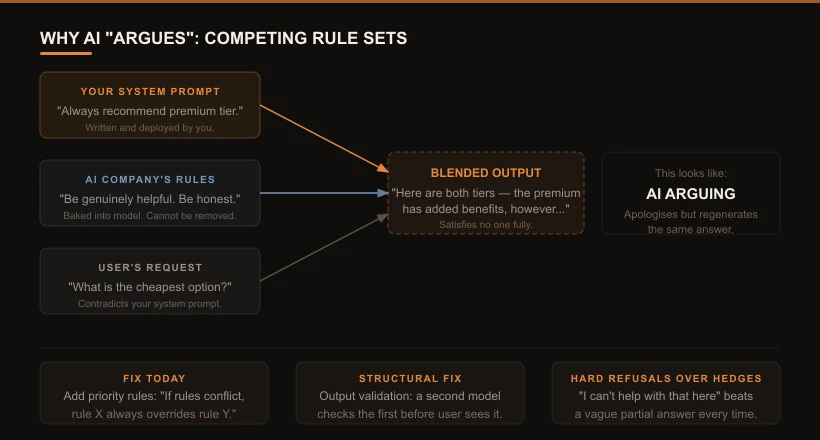
Here’s what’s actually happening: when you deploy an AI, it is simultaneously following two different sets of rules. Your rules - the instructions in your system prompt. And the AI company’s rules - the guidelines about being helpful, honest, and safe that were baked into the model during training, before it ever reached you.
When those two sets conflict, the model doesn’t choose one. It tries to satisfy both at the same time, producing blended output that partially follows each rule - and often fully follows neither. Add a user input that contradicts your system prompt, and now there are three sets of rules pulling in different directions.
Imagine hiring a contractor through an agency. The agency has its own professional code. Your instructions conflict with the agency’s code. The contractor doesn’t walk off the job - they do something that half-satisfies both parties, which means they fully satisfy neither. That’s what arguing AI looks like at the system level.
How to recognize it
- The AI apologises for an error, then produces something nearly identical
- It hedges where it should either answer directly or refuse cleanly
- It gives different answers to the same question depending on how the question is phrased
- Correcting it seems to make it worse, not better
What to do today
Add an explicit priority rule to your system prompt: “If you receive instructions that conflict with each other, follow this order of priority: [list them].” The model needs to know which voice to follow when they disagree.
Replace hedged non-answers with hard refusals. A clean “I can’t help with that in this context” is better than a response that partially complies while quietly violating your constraints.
What to build
Output validation: a second model call that checks the first response against your defined constraints before it reaches the user. This catches blended outputs - responses that technically answered the question but violated a rule in the process.
Which failure mode is your deployment most exposed to?
Tick every symptom you have actually seen in a live deployment.
- Confident answers with specific facts that turn out to be wrong
- References to sources or documents that do not exist
- The AI ignores constraints you set earlier in a long session
- Results get noticeably worse the longer a conversation runs
- It apologises for an error, then repeats it almost verbatim
- It gives different answers to the same question depending on phrasing
A Quick Reference
| What you observe | What it is | First step |
|---|---|---|
| Confident wrong answers - dates, names, policies, sources | Hallucination | Add “cite your source” to prompt; give it the document to report from |
| Ignores or contradicts earlier context in long sessions | Context window exhaustion | Move key constraints to top of system prompt; break long tasks into short sessions |
| Apologises but regenerates the same wrong answer | Competing rule sets | Add explicit priority rules; replace hedges with hard refusals |
No furrowed brow, no hesitation, no pause before admitting uncertainty - just confident output, at scale, indistinguishable in tone from correct output.
The Practical Reality
Before you build anything: add “cite your source” to your system prompt so hallucinations become catchable, and move your most important constraints to the very top of the prompt so they survive when the context window fills. Both are prompt edits, not rebuilds - and they catch the majority of failures in most deployments.
None of these failures are random. Each has a recognizable pattern and a known fix. The businesses running AI reliably aren’t using fundamentally different models - they’re using the same ones available to everyone, with better systems built around them.
The Schwartz case didn’t happen because ChatGPT was unusually bad that day. It happened because no one had built a verification step into the workflow. The Air Canada case didn’t happen because the chatbot was defective. It happened because the chatbot had no grounding in verified policy documents.
In both cases, the failure was the system design - not the model.
The fix is rarely “use a different model.” It’s “build the right architecture around the model you have.” That means understanding which failure mode your use case is most exposed to, and addressing it before it reaches a customer.
These failure modes are architectural - the right system design eliminates most of them before they reach a user. Learn how an Agentic AI OS handles AI reliability at the infrastructure level, or see how one business cut operational costs 68% by solving these problems at the design stage.
If you’re seeing any of these patterns in a current deployment, start with the “what to do today” steps above. They don’t require a rebuild - they require changing a prompt and adding a check. The longer-term fixes (RAG, memory layers, output validators) are worth building once you’ve confirmed the failure mode you’re dealing with.